
EPISODE · May 11, 2026 · 20 MIN
949-Restoring Bimanual QWERTY Typing with Neuroprosthesis
from Paper Talk
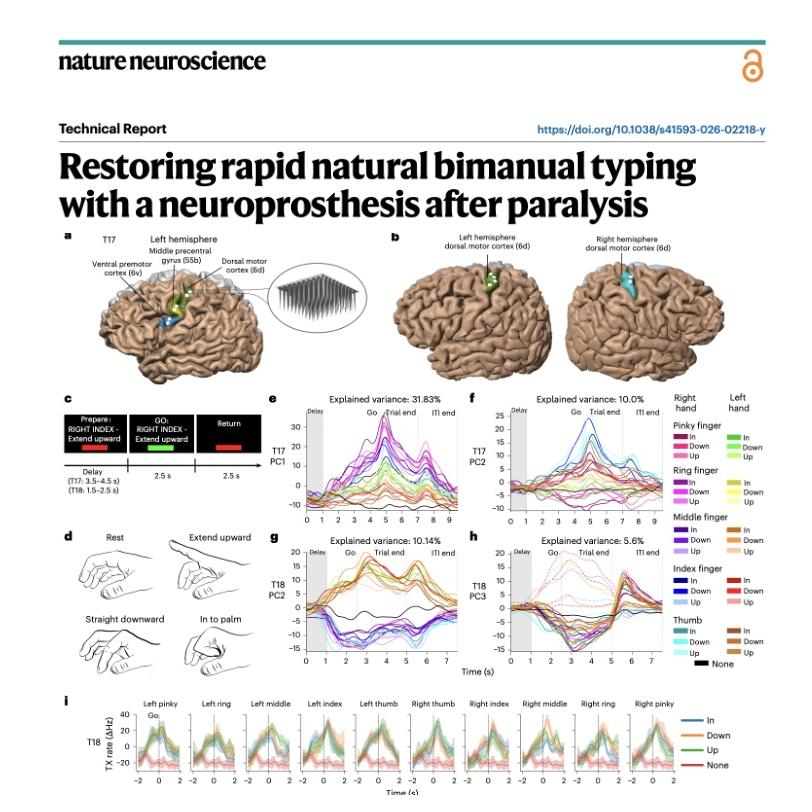
The paper details a technological breakthrough in restoring rapid communication for people with severe paralysis using an intracortical brain-computer interface. Researchers developed a typing neuroprosthesis that allows users to operate a bimanual QWERTY keyboard by simply attempting finger movements. This system achieved a record-breaking speed of 110 characters per minute, significantly surpassing previous hand-motor interfaces while maintaining high accuracy through a recurrent neural network and language models. The study included participants with ALS and spinal cord injuries, demonstrating that neural signals for bimanual typing are robust even when recorded from a single hemisphere. Because it utilizes a familiar keyboard layout, the interface is intuitive, easy to learn, and requires minimal daily calibration. Ultimately, this innovation offers a faster and more private alternative to existing assistive technologies like eye-gaze trackers or speech-to-text systems.References:Jude J J, Levi-Aharoni H, Acosta A J, et al. Restoring rapid natural bimanual typing with a neuroprosthesis after paralysis[J]. Nature Neuroscience, 2026: 1-10.前往小宇宙评论区与主播互动
Embed this episode
Ready to play
949-Restoring Bimanual QWERTY Typing with Neuroprosthesis
No transcript for this episode yet
Similar Episodes
No similar episodes found.
Similar Podcasts
No similar podcasts found.