
EPISODE · Aug 12, 2026 · 17 MIN
Course 40 - Web Scraping with Python | Episode 32: Native Data Storage and Implementation
from CyberCode Academy · host CyberCode Academy
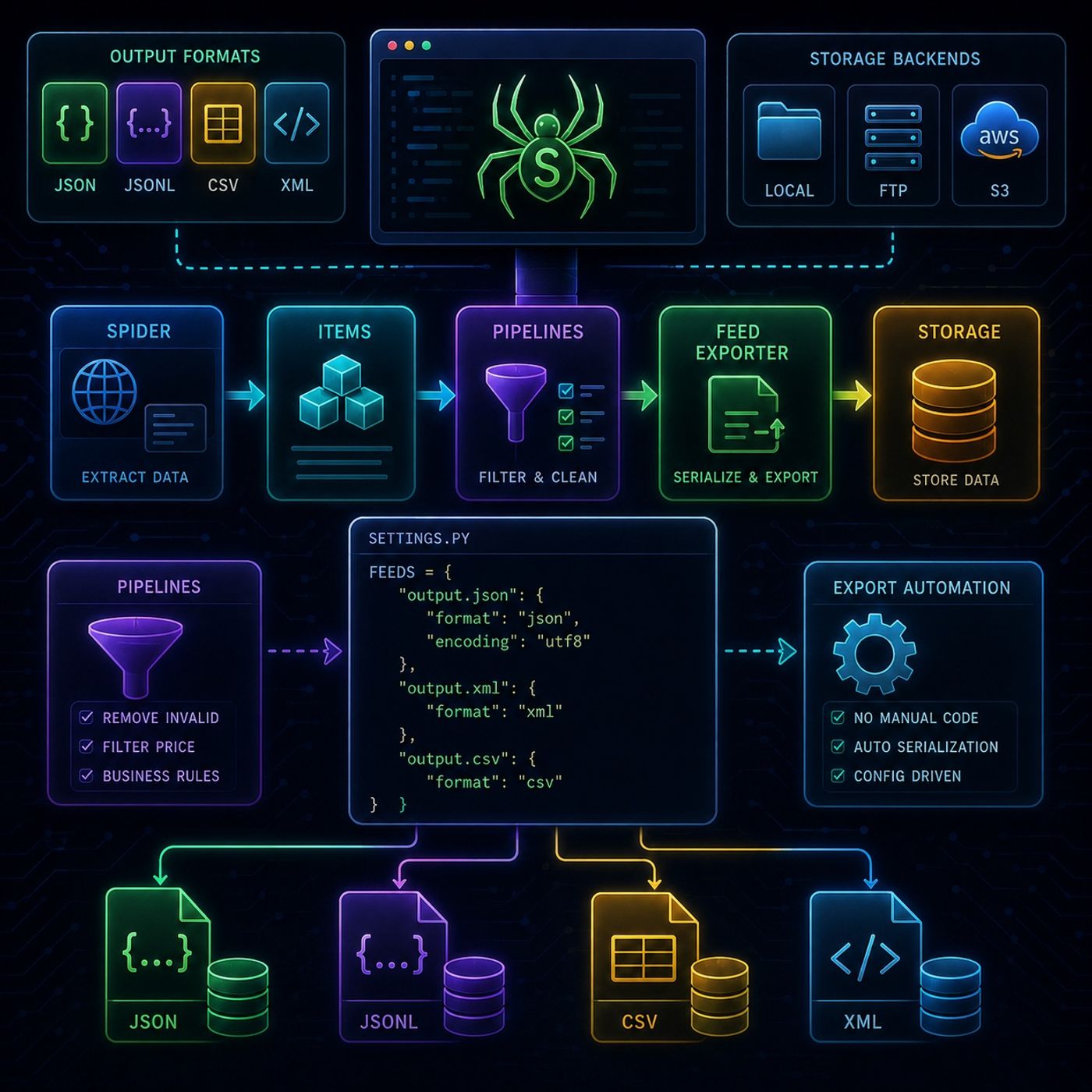
This episode is about removing custom storage code from your Scrapy project and replacing it with Scrapy’s built-in Feed Export system, which turns scraping into a fully configurable data export pipeline.📤 Scrapy Feed Exporters (Automated Data Storage)🧠 Core IdeaInstead of manually writing data to files or databases, Scrapy can automatically export scraped items using:Feed Exporters = built-in serialization + storage systemThey handle:formattingwritingdestination management📊 1. Supported Output FormatsScrapy can serialize scraped data into multiple formats:🧾 File formatsJSON → full structured exportJSON Lines (JSONL) → streaming-friendly formatCSV → spreadsheet-ready formatXML → hierarchical structured outputEach format is useful depending on downstream usage:JSON → APIs & appsCSV → Excel / analyticsXML → structured integrationsJSONL → big data pipelines🌍 2. Storage BackendsFeed exporters are not limited to local files.They can write directly to:💻 Local filesystem📡 FTP servers☁️ Amazon S3 (cloud storage)This makes Scrapy suitable for:enterprise-level data pipelines without extra storage code⚙️ 3. Pipeline + Export IntegrationA key concept in this episode is the separation of concerns:🔹 Pipelines (data filtering layer)Used to:remove unwanted itemsenforce business rulesclean or block dataExample:drop books above a certain pricefilter invalid entries🔹 Feed Exporters (storage layer)Used to:take final cleaned itemsserialize themwrite them to destination🧪 4. Configuration-Driven DesignInstead of writing export logic in code, everything is moved into:🛠️ settings.pyYou define:output formatoutput destination (URI)export behaviorExample conceptually:FEEDS: output.json: format: json encoding: utf8 🔄 5. Full Data FlowSpider ↓ Item Extraction ↓ Pipelines (filter + clean) ↓ Feed Exporter (serialize) ↓ Storage (file / S3 / FTP) 🧪 6. Practical Demo InsightThe episode’s demo reinforces:✔ Filtering firstItems are removed before export via pipelines.✔ No manual savingNo open() or file handling needed.✔ Automatic export generationScrapy generates:JSON outputXML outputstructured datasets🧠 Key TakeawayThe main idea is:Scrapy becomes a configuration-driven data exporter, not just a scraper.You define:what to extract (spider)what to keep (pipelines)where to store it (feed exporters)Everything else is automated.🚀 Big PictureThis module completes the Scrapy data pipeline:StageResponsibilitySpiderExtract dataPipelineClean/filter dataFeed ExporterSerialize + store dataYou can listen and download our episodes for free on more than 10 different platforms:https://linktr.ee/cybercode_academy
Embed this episode
Ready to play
Course 40 - Web Scraping with Python | Episode 32: Native Data Storage and Implementation
No transcript for this episode yet
Similar Episodes
No similar episodes found.