Course 40 - Web Scraping with Python | Episode 33: Foundations of Scraping Dynamic Webpages with Python and Selenium episode artwork

EPISODE · Aug 13, 2026 · 20 MIN

Course 40 - Web Scraping with Python | Episode 33: Foundations of Scraping Dynamic Webpages with Python and Selenium

from CyberCode Academy · host CyberCode Academy

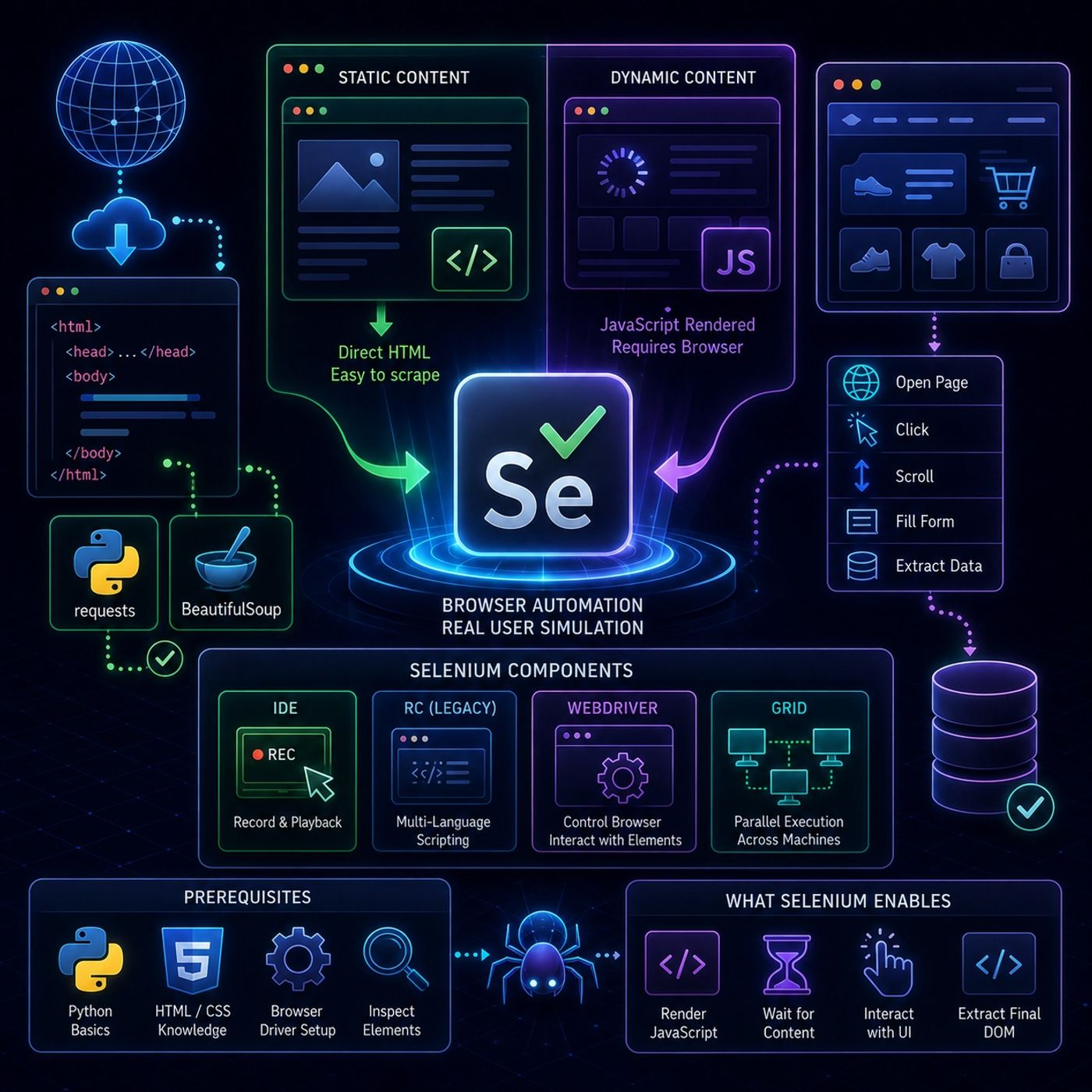
This episode is essentially a setup guide for moving from simple HTTP-based scraping to full browser automation using Selenium, especially for websites where content is rendered or modified by JavaScript.🌐 Web Scraping vs Dynamic Web Pages🧾 What “web scraping” means hereWeb scraping is framed as:Converting web page content into structured data for analysisBut the key challenge is that not all content is immediately visible in HTML.🧱 Static vs Dynamic Content📄 Static contentSame HTML for every userCan be scraped with tools like Requests or BeautifulSoupNo JavaScript dependency⚡ Dynamic contentChanges based on:user interactiontimelocationJavaScript executionOften not present in raw HTMLRequires browser simulation to access🤖 Why Selenium is NeededTraditional scrapers only download HTML.But modern websites:render content with JavaScriptload data after page loadrequire clicks/scrolling to reveal content👉 Selenium solves this by controlling a real browser.🧰 Selenium OverviewSelenium is described as an automation framework for browsers, not just a scraping tool.It allows you to:open web pagesclick buttonsscroll pagesfill formssimulate real users🧩 Core Selenium Components1. 🧪 Selenium IDERecord & playback toolUsed for quick prototypingNo coding required2. 🧬 Selenium RC (Legacy)First generation frameworkAllowed multi-language test scriptsNow largely obsolete3. 🧭 Selenium WebDriver (Main tool)This is the core engine used in real projectsIt:directly controls the browserexecutes user-like actionsinteracts with page elements👉 This is the most important part for scraping dynamic sites4. 🌐 Selenium GridEnables parallel executionRuns tests across multiple machines/browsersUsed for scaling automation⚙️ Prerequisites for Using SeleniumBefore practical usage, you need:Python basicsHTML/CSS understandingBrowser driver setup (ChromeDriver / GeckoDriver conceptually)Ability to inspect web elements🚀 What Selenium Enables in ScrapingWith Selenium WebDriver, you can:load JavaScript-heavy pageswait for content to appearinteract with UI elementsextract final rendered DOMThis is crucial for modern websites like:dashboardssocial media pagese-commerce filtersinfinite scroll pages🧠 Key InsightThe main takeaway is:Traditional scrapers read HTML. Selenium scrapes the rendered browser state.That difference is what makes it powerful for dynamic content.You can listen and download our episodes for free on more than 10 different platforms:https://linktr.ee/cybercode_academy

Episode metadata supplied by the publisher feed · Published Aug 13, 2026

Embed this episode

Ready to play

Course 40 - Web Scraping with Python | Episode 33: Foundations of Scraping Dynamic Webpages with Python and Selenium

0:00 20:06

No transcript for this episode yet

We transcribe on demand. Request one and we'll notify you when it's ready — usually under 10 minutes.

No similar episodes found.

Lead with Faith: Empowering the Next Generation Jermaine Whiteside The Empowering Future Leaders Podcast – Presented by Anointed Connect Academy and hosted by Jermaine E. Whiteside, Doctoral Candidate in Christian Education, this podcast is your gateway to faith-driven leadership, lifelong learning, and real-world success strategies. Each episode blends inspiration with action, spotlighting career pathways, professional exam preparation, and innovative educational resources designed to equip the next generation of leaders.With candid conversations, expert insights, and transformative stories from students, educators, and industry leaders, we address the challenges facing at-risk and underserved communities while providing tangible tools to overcome them. Rooted in Christian values and a commitment to generational impact, this podcast empowers students, parents, and professionals to break barriers, build skills, and boldly pursue their God-given purpose. Fearless Podcasting Academy | Unlock Your Voice and Audience Dr. Stephanie Dean | Podcasting Strategist Your voice has the power to inspire, impact, and ignite change—but only if people hear it. Join Dr. Stephanie Dean at Fearless Podcasting Academy, where creators and entrepreneurs learn podcasting strategies to amplify their voices and build podcasts that demand attention. Here, we don't just talk about podcasting. We talk about bold storytelling, creative innovation, and the courage to show up unapologetically. Whether you're launching your first episode or leveling up your platform, you'll get proven strategies, expert insights, and the confidence to make your message matter. Because your story isn't just worth telling—it's worth hearing. Hit subscribe and step into your fearless voice. How to make APP - iOS APP creator, CEO of Catch Questions Academy will talk about IT tips and future Catch Questions iOS APP creator, CEO of Catch Questions Academy will talk about IT tips and future.Those who are interested in developing some app for business or your hobby would be recommended to try to listen to my talk and to have a look at the following links.Now, everybody can create your app and can play it.You can see my iOS apphttps://youtube.com/channel/UCHUbbI9KrwkPPnjN0q1z-lQMy Amazon Kindle for Swift X Pythonhttps://www.amazon.com/dp/B0896766GDCatch Questions Academyhttps://catch-questions.com/englishFind me in TwitterMake APP iPhone@ceo_ios The President's Desk at Hillcrest Academy Brad Hoganson Exploring the link of discipleship, mentorship and classical education at Hillcrest Academy.

Frequently Asked Questions

How long is this episode of CyberCode Academy?

This episode is 20 minutes long.

When was this CyberCode Academy episode published?

This episode was published on August 13, 2026.

Can I download this CyberCode Academy episode?

Yes. Use the download control on the episode player to save the publisher-provided media file.
URL copied to clipboard!