
EPISODE · Aug 14, 2026 · 19 MIN
Course 40 - Web Scraping with Python | Episode 34: Architecture, Setup, and Basic Web Automation
from CyberCode Academy · host CyberCode Academy
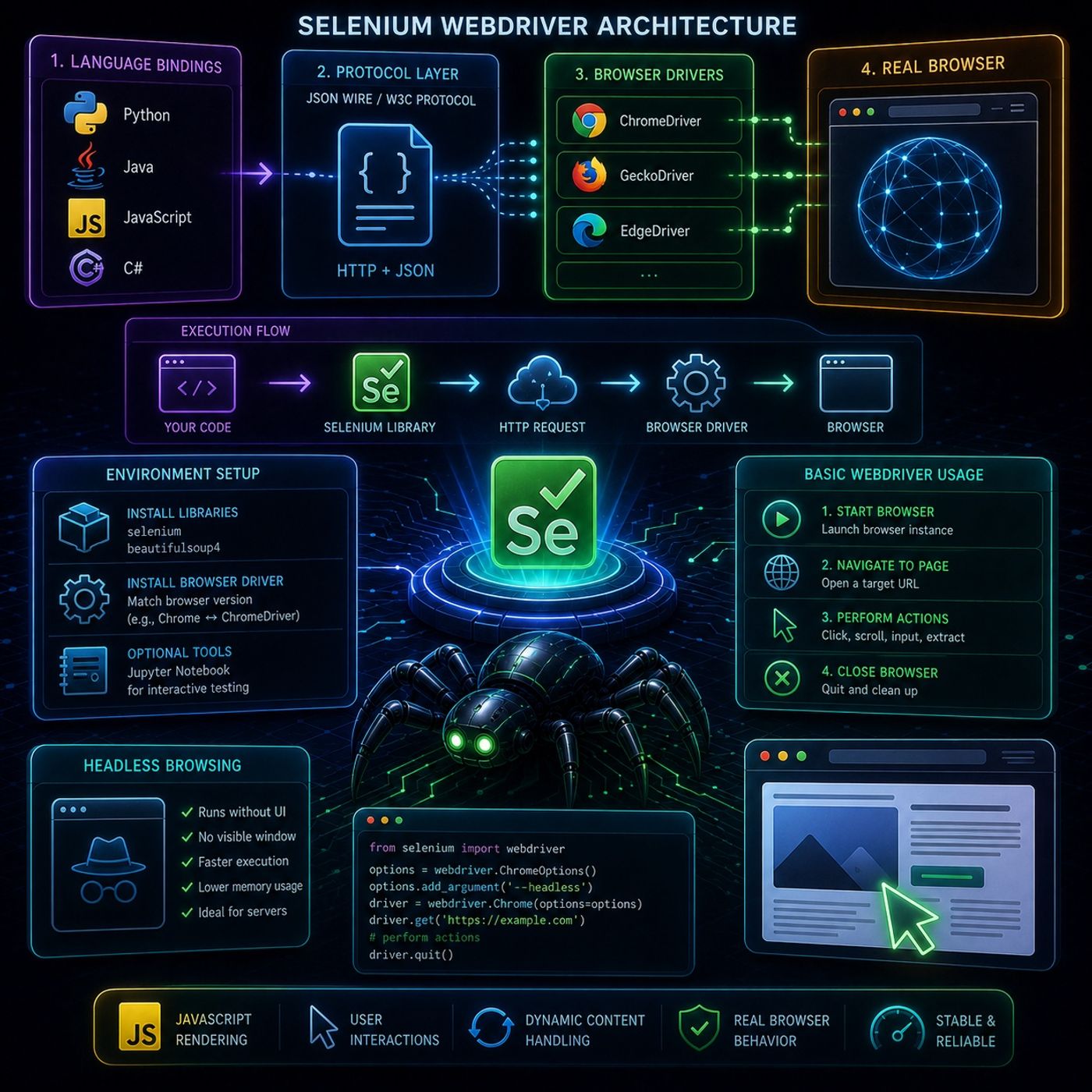
This episode focuses on how Selenium WebDriver actually works under the hood, and then walks into the practical setup and first automation steps.🧠 Selenium WebDriver ArchitectureSelenium WebDriver is designed to control browsers as realistically as possible, which is why it uses a multi-layer architecture instead of direct code-to-browser control.🧩 1. Language BindingsThese are client libraries that let you write automation scripts in different languages:PythonJavaJavaScriptC#They translate your code into commands WebDriver can understand.🌐 2. JSON Wire Protocol (or W3C WebDriver Protocol)This is the communication layer.Your script sends HTTP requestsCommands are encoded as JSON payloadsThese requests are sent to the browser driverThink of it as:“Selenium speaking HTTP to the browser”🧭 3. Browser DriversEach browser has its own driver:Chrome → ChromeDriverFirefox → GeckoDriverTheir job is to:receive commandstranslate them into browser-native actions🖥️ 4. Real BrowserFinally, the driver controls the actual browser:opens pagesclicks elementsexecutes JavaScriptrenders content⚙️ How Execution FlowsA Selenium action follows this chain:Your Python code → Selenium library → HTTP request → Browser Driver → BrowserThis layered design is what allows cross-browser automation.🛠️ Environment Setup OverviewThe episode walks through setting up a working Selenium environment:📦 Install core librariesSelenium (automation engine)BeautifulSoup (optional parsing tool)🌐 Install browser driverMust match your browser version exactlyExample: Chrome version ↔ ChromeDriver version📓 Optional toolsJupyter Notebook for interactive testingUseful for debugging selectors step-by-step🚀 Basic WebDriver UsageOnce setup is complete, the workflow becomes:1. Start browser instanceLaunch Chrome/Firefox via WebDriver2. Navigate to a pageOpen a URL like a normal user3. Perform actionsclickscrollinput textextract elements4. Close browserclean shutdown of session🧊 Headless BrowsingA key optimization introduced is headless mode.What it means:Browser runs without UINo visible window opensWhy it matters:faster executionlower memory usageideal for servers and automation pipelines🧠 Key InsightThe main idea of this episode is:Selenium is not just a scraping tool — it's a remote control system for real browsersThat’s why it can handle:JavaScript-rendered contentuser interactionsdynamic page updatesYou can listen and download our episodes for free on more than 10 different platforms:https://linktr.ee/cybercode_academy
Embed this episode
Ready to play
Course 40 - Web Scraping with Python | Episode 34: Architecture, Setup, and Basic Web Automation
No transcript for this episode yet
Similar Episodes
No similar episodes found.