
EPISODE · Aug 16, 2026 · 23 MIN
Course 40 - Web Scraping with Python | Episode 36: Comprehensive Element Locating and Advanced Webpage Navigation
from CyberCode Academy · host CyberCode Academy
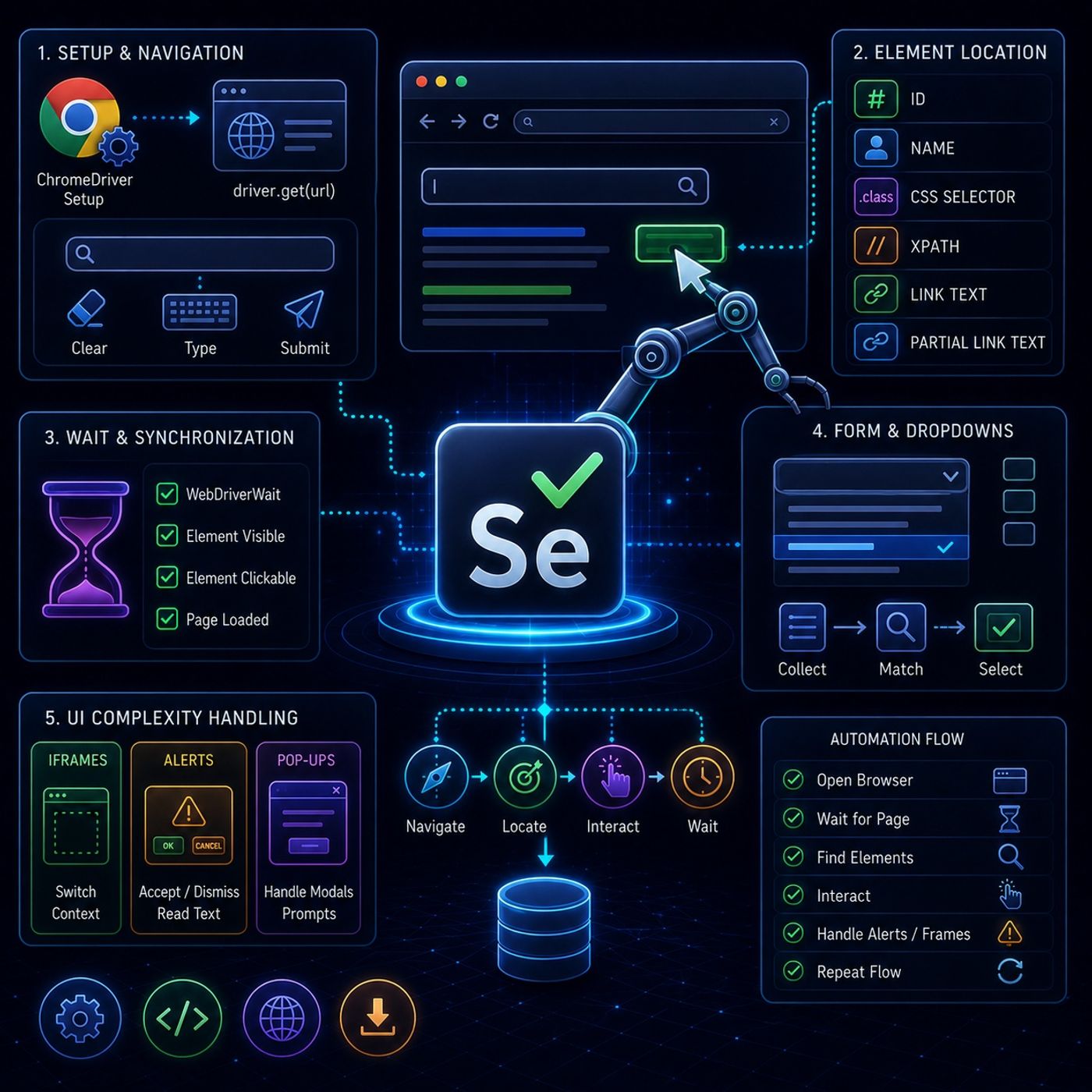
This tutorial series is basically showing how Selenium moves from “clicking elements” into real-world browser automation, where pages are messy, slow, and full of UI traps.🧭 1. Core Setup + Basic NavigationEverything starts with controlling the browser:ChromeDriver setupActs as the bridge between Python and Chromedriver.get(url)Opens a webpage inside the automated browser sessionOnce the page loads, the first interactions usually target simple inputs like search bars.✍️ Basic interaction flowTypical steps:locate input fieldclear existing textsend new text using keyboard inputsubmit or trigger searchThis is the foundation of all automation flows.🎯 2. Element Location (the real core skill)The series reinforces multiple ways to find elements depending on page structure:🆔 ID (best case)fastest and most stable🏷️ Namecommon in forms (login, search, signup)🎨 CSS Selectorsuses class-based targetingflexible and widely used in real projects🧭 XPathmost powerful optionworks even when HTML is messy or missing IDs/classes🔗 Linksexact link textpartial link textUseful for navigation between pages.⚙️ 3. Handling Real Web Behavior (Dynamic Pages)This is where Selenium becomes “real automation” instead of simple scripting.⏳ WebDriverWait (critical concept)Modern websites load content asynchronously, so elements might not exist immediately.Instead of failing instantly, Selenium can:wait until element appearswait until element becomes clickablepause execution until condition is metThis prevents most “element not found” errors.🧾 4. Complex Form HandlingForms are not just text inputs — they include dropdowns, validations, and dynamic fields.📋 Dropdown strategyInstead of selecting blindly:collect all elementsloop through themmatch desired valueclick selectionThis makes automation resilient when UI order changes.🧱 5. Handling Real UI Complexity🪟 iframesembedded pages inside pagesSelenium cannot access them directlymust switch context before interacting⚠️ Pop-ups / Alerts / PromptsYou can:accept (OK)dismiss (Cancel)read alert textThese often block automation flows if not handled.🧠 Key InsightThis module is really about this transition:from “clicking elements” → to “controlling unpredictable browser behavior”Because real websites are not static:they load slowlythey restructure DOM dynamicallythey interrupt workflows with modals and alerts⚡ Summary Mental ModelThink of Selenium automation like this:Open browserWait for page stabilityFind elements reliably (ID/CSS/XPath)Interact carefully (click/type/select)Handle interruptions (alerts, iframes, delays)Repeat across navigation flowsYou can listen and download our episodes for free on more than 10 different platforms:https://linktr.ee/cybercode_academy
Embed this episode
Ready to play
Course 40 - Web Scraping with Python | Episode 36: Comprehensive Element Locating and Advanced Webpage Navigation
No transcript for this episode yet
Similar Episodes
No similar episodes found.