
EPISODE · May 29, 2006 · 8 MIN
Create and use Metadata Templates in Bridge
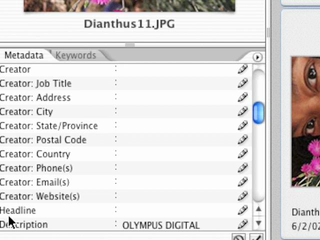
If you're shooting digital then chances are you're massing thousands of photos. How will you ever find what you're looking for? The key is entering metadata into the images themselves. However, who wants to do it image-by-image and even when you're doing groups at a time who wants to enter the same data over and over again such as copyright info? In this episode you'll learn how to create a metadata template using Photoshop and to apply that template to your images in the Bridge.
Embed this episode
Ready to play
Create and use Metadata Templates in Bridge
0:00
8:00
1×
No transcript for this episode yet
Similar Episodes
No similar episodes found.
Similar Podcasts
No similar podcasts found.
Frequently Asked Questions
How long is this episode of Adobe Creative Cloud TV?
This episode is 8 minutes long.
When was this Adobe Creative Cloud TV episode published?
This episode was published on May 29, 2006.
Can I download this Adobe Creative Cloud TV episode?
Yes. Use the download control on the episode player to save the publisher-provided media file.
URL copied to clipboard!